FPV Race ManagerFlyraces.Notpaperwork.

The FPV Race Manager is the tournament app for 8 to 60 pilots: it splits heats, assigns video channels, calls spotters and walks you through race day — you just tap who crossed the line first.

  • Free for community races
  • Browser & installable app
  • 8–60 pilots
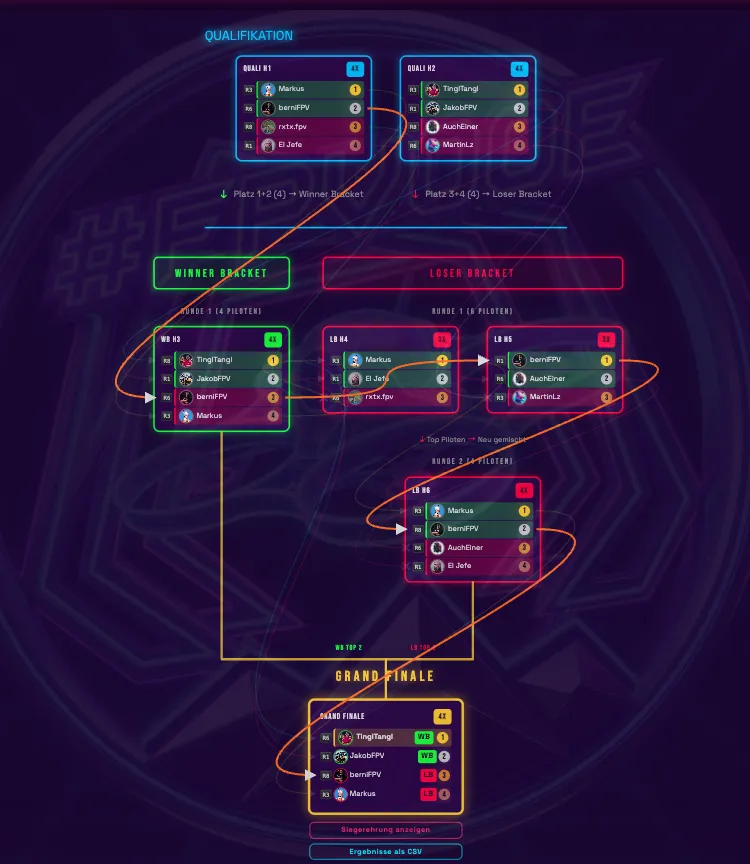
App tournament bracket: qualification, winner bracket, loser bracket and grand final with colored heat cards
LiveHeat 6 / 12
ActiveR7 · WB R2
SpotterEva → Tobias
Pilots per race
8–60
Pilots per heat
3–4
Heats generated
Auto
Paper & Excel
0

The format

Fromthestartgridtothepodium.

A race day has four stages. The app walks you through them in order — including every heat that becomes necessary along the way.

  1. 01
    8–60 pilots

    Sign up & seed the field

    Pilots add themselves through the signup link — or you build the roster from the pilot directory. From 8 up to 60 starters.

  2. 02
    3- & 4-pilot heats

    Qualification

    The app computes the heats: as many 4-pilot heats as possible, the rest as 3-pilot heats. Nobody flies alone, nobody waits for a 2-pilot run.

  3. 03
    Double elimination

    Winner & loser bracket

    Places 1–2 stay in the winner bracket, places 3–4 get their second chance in the loser bracket. The loser bracket waits for the matching winner round — nobody gets an unfair head start.

  4. 04
    4 finalists

    Grand final

    The top two from both brackets fly the final. Then the podium is set — with confetti, places 1 to 4 and one click for the CSV export.

Why double elimination? A slip or a battery that gives up early is not a tournament exit. Everyone gets two chances, and there is still exactly one winner at the end.

What the app takes over

Threethingsthatotherwiseeatuphours.

Computing heats, swapping channels, finding spotters: that is exactly what the app does in the background. You keep the overview and make the decisions that really matter.

01 · Heats

Heats that compute themselves.

One click spreads the whole field across 3- and 4-pilot heats — as few runs as possible, with no 1- or 2-pilot heats. Drag, shuffle, rearrange: anything goes until it fits.

  • Drag & drop and shuffle
  • Warnings for overfull or empty heats
02 · Video

Channels that stay put.

R1, R3, R6, R8 — the app remembers who last flew which channel and puts pilots back there for the next heat. Less VTX re-plugging, less waiting at the start.

  • Channel badge right on the name
  • Same-system pilots spread apart
03 · Spotter

Nobody flies without a spotter.

Whoever finishes a heat on R3 spots the next run on R3. The app works out this rotation for every channel at once — including dropouts, eliminated pilots and the very first heat.

  • Goggles receive the system? Preferred
  • Swap the spotter yourself if it doesn't fit

Video system & channels

Thechannelyou'realreadyflying.

If your video system is in your profile, you fly heats with people who can receive it too. The app spreads identical systems across different heats — and puts them on the same channel within a heat so they can spot each other.

  • Channels stay with the pilot

    The app remembers your last Raceband channel and puts you back there whenever possible. No re-plugging between two runs.

  • Goggles have a say

    Whoever receives your system through their goggles is preferred as a spotter. If they can't, the app warns you visibly — anyone may still spot.

  • Five systems, one field

    Analog, HDZero, DJI, Walksnail or other: everything is a soft preference, never a hard exclusion.

AnalogHDZeroDJIWalksnailOther
Heat 07

Winner bracket · Round 2

live
R1kept
THTobias Haas
DJI
R3kept
EHEva Hofer
DJI
R6kept
MBMichael Bauer
Analog
R8new
SGSophie Gruber
HDZero

3 of 4 pilots stay on their channel — three re-plug breaks saved.

Your goggles can't receive analog

Tobias spots Eva (DJI). The app tells you in advance — counting from the outside still works.

Spotters & timing

Everylaphasawitness.

The spotter counts the laps and taps them live on the phone. The app tells everyone who to spot and when — and still sends the call when the pilot has long been eliminated.

LiveHeat 7 / 12 · R3

Your status

Heads up, you're up

You fly heat 07 on R3

Spotting youE Eva Hofer R3
You spotT Tobias Haas R3

Your name turns green in the heat — until the start is tapped.

Next: 2 rounds off, next call heat 09
Lap timer

Tap instead of paper.

Full screen, one huge button, one tap per lap. After the start, anywhere on the screen works — the timer locks for the minimum lap time so a mistap does not count.

Push

Knows when it's your turn.

“You are up next round”, “You are spotting now” or “Signup opened” — five categories, each one switchable. The live indicator shows it on the race page too.

Rotation

Fly R3, spot R3.

After the run, the next pilot on the same channel takes over. If the channel is missing from the next heat, the duty waits. The first heat gets its spotters from the preview — and anyone who is flying is replaced.

Switching spotters

Tap the pilot the app assigned — pick someone better suited, done. Lap-timing and ready rights move with it.

Start signal

Countdown with sound and voice. The closing call starts the holeshot timer for every spotter.

Corrections

Wrong rank? The spotter suggests, race control confirms — or corrects later with a reason.

Race day

20pilots.Onephone.

This is where it usually gets messy: who flies when, who counts laps, which VTX belongs to whom? The app holds the whole day together — from the first signup link to the podium.

20+pilots without paperwork
Autonext heat after confirming
1device for race control
Start signalHeat 07 · R3

Sound and voice run locally — the closing call starts the holeshot.

  1. Before the start

    Open signup, share the link

    One switch is enough: the race becomes findable, eligible pilots get a push notification and add themselves. Anyone with an incomplete profile sees exactly what is missing.

  2. 2 minutes before heat 1

    Confirm the heat split

    The heats are already waiting. One look, rearrange if needed, confirm — the race is live and the bracket shows every upcoming heat as a preview.

  3. Every heat

    Ready, countdown, go

    Pilot or spotter reports ready — the name turns green. Then the countdown runs with sound and voice callouts, and the closing call starts the holeshot timer.

  4. After the finish line

    Tap the placings

    Tap the pilots in finish order, optionally enter lap times. Done confirms the heat and the next one becomes active automatically. Older results can be corrected with a reason.

  5. To wrap up

    Podium, export, cups

    The app generates the final itself. Afterwards: podium with the top 4, CSV export, archive the race. Cups and overall standings compute points across all races.

Inside the app

Oneraceday,realscreenshots.

From the first form to the overall standings: these views show what you and your pilots actually see on race day.

  • Race setup

    Ready in minutes

    Name, date, community and location — after that, signup is just a switch away.

  • Self signup

    Profile in one pass

    Name, Instagram and video system: pilots enter themselves what matters for heats and spotters.

  • Live bracket

    The active heat stays in view

    Qualification, winner and loser bracket: the running heat is marked, the next round already waits below.

  • Ready to fly

    Everyone sees when it's their turn

    “Heads up, you are up” plus the assigned spotter — no shouting across the field.

  • Results

    Placings by tap

    Tap pilots in finish order, add times if you like. Done confirms the heat.

  • Lap timer

    Timing without paper

    One tap per lap, a minimum lap time against mistaps and the total time at the end.

  • Swap spotter

    The assignment stays flexible

    Tap whoever fits better — lap timing and ready rights move with it.

  • Push

    Five categories, each switchable

    Race start, next round, spotting now: everyone decides what their phone reports.

  • Pilot profile

    The directory with a face

    Signups, appearances, podiums and best placing — counted from results automatically.

  • Cups

    Several races, one standings table

    Bundle races into a cup — public or private, with the same points logic.

  • Points system

    Standings without extra work

    25-20-16-13 … points plus participation points, traceable right inside the app.

  • Overall standings

    Sortable down to the detail

    By points, wins, podiums or appearances — every standing compares directly.

Live bracket

Thewholetournamentataglance.

No graveyard of tables: the tree grows with the race, the active heat is marked, and every click opens placings, lap times and holeshot.

Bracket with pilot paths overlaid: orange lines trace one pilot through qualification, winner bracket and grand final
QualificationWinner bracketLoser bracketGrand final
Z

Fit to view

The first press shows the whole bracket, pressing again jumps back.

P

Pilot paths

Every flight path as a line — with an X marker where someone was eliminated.

Scroll

Zoom & pan

Mouse wheel or touchpad to zoom, drag to move. Ctrl/Cmd + double click resets.

Spectators get the same view read-only and live — with SSE, polling fallback and an offline notice in case the wifi at the edge of the woods acts up.

Everything included

Smalldetails,bigraceday.

Each one came out of a real race day. None of them needs a training session.

Signup link instead of a phone tree

One switch opens self-signup. Pilots join with one tap, get a push notification and see the race link to share.

Pilot directory with faces

Avatar, Instagram handle and video system per pilot. Images are shrunk and served fast automatically — handy for the podium and the heats.

Rearrange heats

The automatic split is the starting point. Drag, shuffle and validate until the pairings fit — the app warns about overfull or empty heats.

Preview of every heat

Before the first start, the full tree stands as a grey preview. Everyone sees how many runs the race day will take.

Click ranking

Tap the pilots in finish order — done. Tied ranks are allowed, duplicate places are not. Optional time entry on mobile devices.

Lap times & holeshot

Three to five digits are enough: 123 becomes 1:23. The holeshot is measured to the hundredth and counts toward total time, not the first lap.

Start signal

Full-screen countdown with sound and voice on race control's device. Cancel with Escape, change the sound only from the next signal on.

Push when it counts

“You are up now”, “You spot next round” or “Race started” — five categories, switchable per account, test notification included.

Spectator live view

Read-only view with the same heats, spotter assignments and heat details. Ideal for a projector, a screen or the parents at the edge.

Cups across events

Bundle several races into one cup. The cup standings use the same points system as the overall standings — nothing to maintain by hand.

Overall standings

25-20-16-13 … points plus 10 participation points per flown race. Sortable by points, wins, podiums and appearances.

CSV & archive

Export results as CSV. Archive races (they stay in history and cups) or hide them without losing data.

Also included
  • Installable as an app (PWA)
  • German & English
  • Help panel inside the app
  • Corrections with a reason
  • Race slugs instead of UUIDs
  • Spectator heat dialog

Origin & intent

BuiltintheFPV-OOEcommunity.

The FPV Race Manager is not a company product: it grows out of the FPV-OOE community — built by pilots and race directors who wanted their own race days to be less chaotic. We provide it to the whole FPV community, free of charge and without ads.

Origin
FPV-OOE community
What it is
Hobby project
Built for
Hobby & small races
Send feedback to FPVOOE

A bug, a missing feature, or a race day that went differently? That is exactly where the next version comes from.

Frequently asked

Quickanswers.

Still unsure? The docs go deeper, and for everything else you can reach FPVOOE directly.

Browse the documentation
What is the FPV Race Manager?

The FPV Race Manager is the web app for FPV drone racing: it builds the tournament bracket, splits heats and video channels, rotates spotters and keeps results live — from the first heat to the podium. All you need is a browser.

What does it cost?

It is free for hobby and community races without entry fees or sponsorship. As soon as entry fees are charged or sponsors are involved, a commercial license is required — just get in touch with FPVOOE.

How many pilots fit into one race?

Between 8 and 60 active pilots. Below 8 the app will not start, so that every pilot can have their own spotter in every heat. Above 60 it stops — that is the limit up to which heat and channel planning still makes sense.

Do I need a timing system?

No. The default is spotter timing: an assigned spotter taps the laps on the phone, and the app computes holeshot and total time. Alternatively race control enters the times directly while placing pilots — or skips them entirely.

What happens if my video system does not match the others?

Nothing bad. The system is a soft preference: the app prefers spotters who can receive it through their goggles but excludes nobody. If your own goggles run a different system, the app visibly points out that you will have to count from the outside.

Can I correct a result afterwards?

Yes, as long as the race is running. In the heat detail view you reset a result — with a mandatory reason. If the heat is not at the end, the confirmation dialog lists every heat that then has to be flown again.

Does it work on a phone without an app store?

The app runs in the browser on phone, tablet and desktop. On iOS and Android you can add it to the home screen as a PWA and it starts full screen. An internet connection is required on race day.

Who is behind the FPV Race Manager?

A hobby project of the FPV-OOE community. Pilots and race directors built the app for their own race days and provide it to the whole FPV community. There is no company behind it and no support commitment — but every piece of feedback from a real race goes straight into the next version.

Is the app suitable for official or commercial races?

No, we explicitly do not recommend it for that. It is made for hobby races and small community races; for championships, entry fees, sponsorship or a dedicated timing system, a professional system belongs in place. The app is a hobby project and may contain bugs.

Why is the app free?

Because it comes from the community and stays in the community. For hobby and community races without entry fees or sponsorship it costs nothing and there are no ads. If you want to support development, get in touch with FPVOOE.

Ready for the next race day

Next race day?Bring it on.

Create the race, share the link, let the pilots fly. Everything else happens in the background.

Free for community races · Runs in the browser · Installable as an app